How to Check Your Business's Online Reputation: A Step-by-Step Audit

Most service business owners first discover a reputation problem when a customer mentions it in person, when someone on the team notices a one-star review, or when call volume drops and no one can explain why.
By the time any of those things happen, the damage has been running for weeks. The review sat unanswered. The wrong phone number on a directory sent callers to a disconnected line. The competitor two doors down collected 60 new reviews while yours stayed flat.
An online reputation check is how you find these things before they compound. Done right, it takes less than an hour and gives you a clear picture of what your reputation looks like to someone searching for your services right now, not what you hope it looks like.
This guide walks through each part of that check in order, explains what to look for at each step, and gives you a grading framework so you know whether what you find is strong, needs attention, or is actively hurting you.
Why a Periodic Reputation Check Matters More Than a One-Time Audit
A reputation audit run once and forgotten is better than nothing, but it is not enough. Your reputation is not a static asset. It changes every time a customer leaves a review, every time a directory pulls outdated data from an aggregator, and every time Google reindexes your branded search results.
For service businesses specifically, three things make reputation more volatile than most owners expect.
First, search volume for service categories is highly local. A pest control company in Phoenix is competing for the same map pack position with five or six other companies. If your review count stalls while theirs grows, you drop in the rankings even if you have done nothing wrong.
Second, the review platforms that matter vary by category. A plumber who dominates Google but ignores Angi is invisible to a large portion of home service buyers who start their search there. A dental practice that has not checked Healthgrades in six months may have an outdated rating pulling down new patient calls.
Third, AI search is now part of the picture. According to data from local search researchers, roughly 45 percent of consumers now use generative AI tools for local service discovery. If your reputation signals are not strong enough for ChatGPT or Perplexity to reference your business, you are missing that traffic entirely.
Run this check every 90 days at minimum. Quarterly is standard for most service businesses. Monthly makes sense if you are in a competitive market or actively working to grow your rating.
Step 1: The Branded Search Check
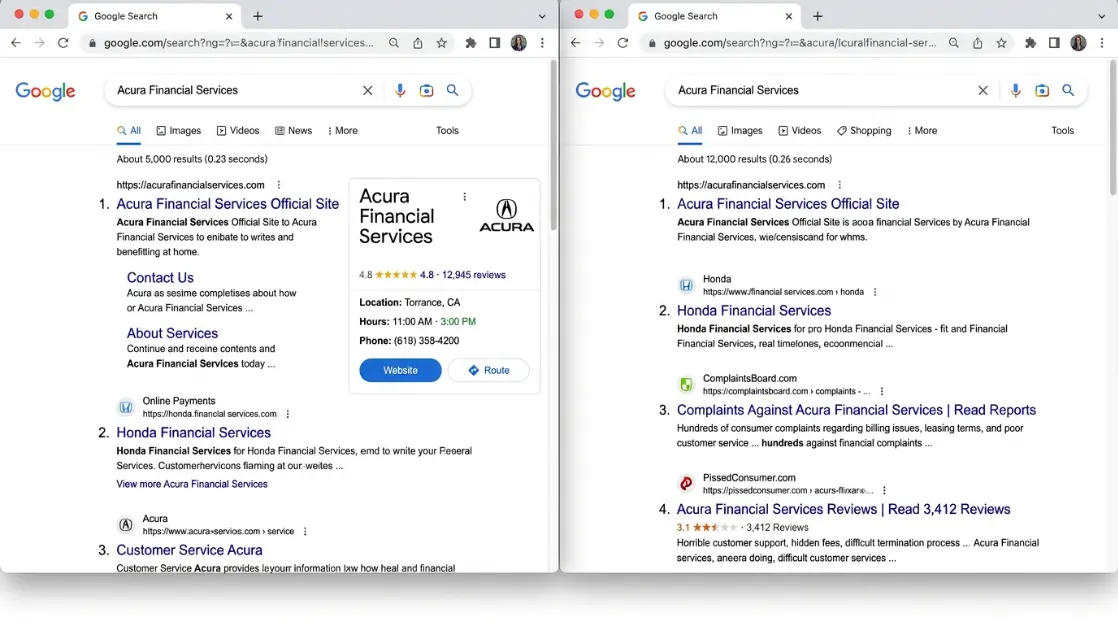
Open a private or incognito browser window so your search history does not filter the results. Search your exact business name.
Look at everything on the first page, not just your website. Write down what you see:
- Does your business website appear in position one for your own name?
- Is there a Google Knowledge Panel on the right side of the results, showing your rating, address, and phone number?
- Do review sites appear in positions two through five? Which ones, and what rating do they show?
- Is there any negative content, a complaint site, a news article, or a competitor page ranking for your brand name?
- Do images appear in the results? If so, do they accurately represent your business?
Then search your name plus "reviews" and look at what platforms dominate. If a Yelp page with a 3.2 rating appears before your Google profile showing 4.7, that Yelp page is doing real damage.
What this tells you: The branded search check shows you what a prospective customer sees in the 30 seconds before they decide whether to call you. It is the most direct measure of your first impression online.
Step 2: The Review Platform Audit
Start with Google Business Profile, since Google reviews carry the most weight for both consumer trust and local search rankings. Log in and check:
- Your current overall star rating
- Total review count
- Date of your most recent review
- Response rate across your last 20 reviews
- Any reviews that were removed, and whether the removal was flagged
Then check every other platform where your customers leave reviews. For most service businesses in the United States, that list includes Yelp, Facebook, Angi, and HomeAdvisor for home services; Healthgrades and Zocdoc for healthcare and dental; Avvo and Martindale for legal; and Houzz or Thumbtack for trades and specialty contractors.
For each platform, record the same four data points: overall rating, total review count, recency of the most recent review, and your response rate.
The number that most owners overlook: Review recency matters as much as rating. A pest control company with 180 reviews averaging 4.6 stars, with the last new review posted four months ago, looks less active than a competitor with 90 reviews averaging 4.4 stars with a review posted last week. Google's local algorithm weights recency heavily, and consumers treat an old review with the same skepticism they treat an expired coupon.
According to BrightLocal's Local Consumer Review Survey, 73 percent of consumers say they only read reviews from the past month when evaluating a local service business.
Reputation management for service businesses includes review generation systems that keep your review velocity steady across all platforms, not just Google. Velocity without strategy produces spikes and lulls that actually hurt more than a slow, steady pace.
Step 3: The AI Search Check
This step did not exist two years ago. It is now one of the most important parts of any reputation check for service businesses.
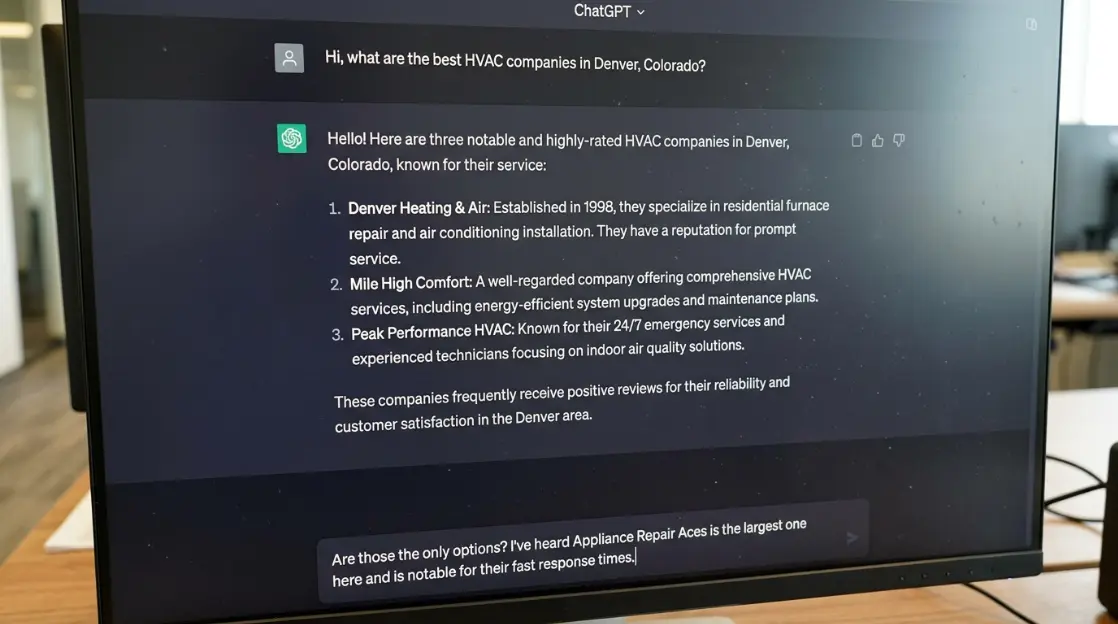
Open ChatGPT, Perplexity, and Google's AI Overview (by searching a query on Google that typically triggers the AI result). Type a query that a real customer would ask:
- "Best pest control company in [your city]"
- "Recommended plumber in [your city and neighborhood]"
- "Which HVAC companies have good reviews in [your city]"
Note whether your business appears in any of the results. If it does not, note which businesses do appear and what review or content signals seem to be supporting their inclusion.
AI tools cite businesses based on a combination of review volume, review sentiment, how consistently the business name appears across reputable directories and sites, and whether there is any relevant content about the business that the AI can reference. A business with 200 reviews averaging 4.7 stars and consistent directory listings is far more likely to appear than one with 80 reviews at 4.3 stars and inconsistent NAP data.
The AI search check is not something you can fix overnight. But knowing whether you appear or not tells you how strong your overall reputation signal is relative to your market.
Step 4: The Directory Accuracy Check
Your business name, address, and phone number appear across dozens of directories: Google, Yelp, Bing Places, Apple Maps, Facebook, Foursquare, Yellow Pages, Angi, Better Business Bureau, and 40 to 60 additional data aggregators that feed local search engines.
When that information is inconsistent, two things happen. Customers who find the wrong phone number call someone else. And Google, which cross-references directory data to confirm local business signals, sees conflicting information and weights your local rankings lower.
For this step, search your business name on each major platform and verify:
- Business name spelled exactly the same way across all listings
- Address formatted consistently (suite number included or excluded the same way everywhere)
- Phone number matching, with the same area code format
- Website URL current and not pointing to an old domain
- Business category accurate on Google and Yelp
Pay special attention to Bing Places and Apple Maps. Both are often neglected and both feed significant traffic. An unclaimed Apple Maps listing with wrong hours has been responsible for a meaningful number of lost bookings for home service businesses, particularly for customers who search via Siri or Apple Maps on iPhone.
If you have moved locations in the past two years, treat this step as urgent. Old address data persists in aggregators for months and sometimes years without a manual correction.
Step 5: Competitor Reputation Benchmarking
Your reputation does not exist in isolation. When a potential customer searches for pest control or a plumber or a dentist in your area, they see your business alongside three to five competitors in the map pack. Your star rating, review count, and response behavior all appear next to theirs.
For this step, identify three direct competitors in your service area and pull the same data points you collected for yourself:
| Metric | Your Business | Competitor A | Competitor B | Competitor C |
|---|---|---|---|---|
| Google Rating | ||||
| Google Review Count | ||||
| Reviews (Last 90 Days) | ||||
| Response Rate | ||||
| Yelp Rating | ||||
| Industry Directory Rating |
Once you fill in the table, the competitive picture becomes clear. If you have a 4.6 rating but your competitors each have over 200 reviews and you have 60, your rating advantage is not enough to overcome the volume gap. If your nearest competitor has a 4.1 rating but reviews from last week while yours are from two months ago, the freshness gap is working against you even though your rating is higher.
According to ReplyOnTheFly's 2026 benchmarking data, home service businesses in competitive markets need a minimum of 4.4 stars and at least one new review per week to remain competitive in the Google Map Pack. Businesses below that threshold lose map pack visibility to competitors who meet it.
The guide to what reputation monitoring covers explains how a monitoring system tracks these competitor signals automatically, rather than requiring a manual check every 90 days.
How to Grade What You Found
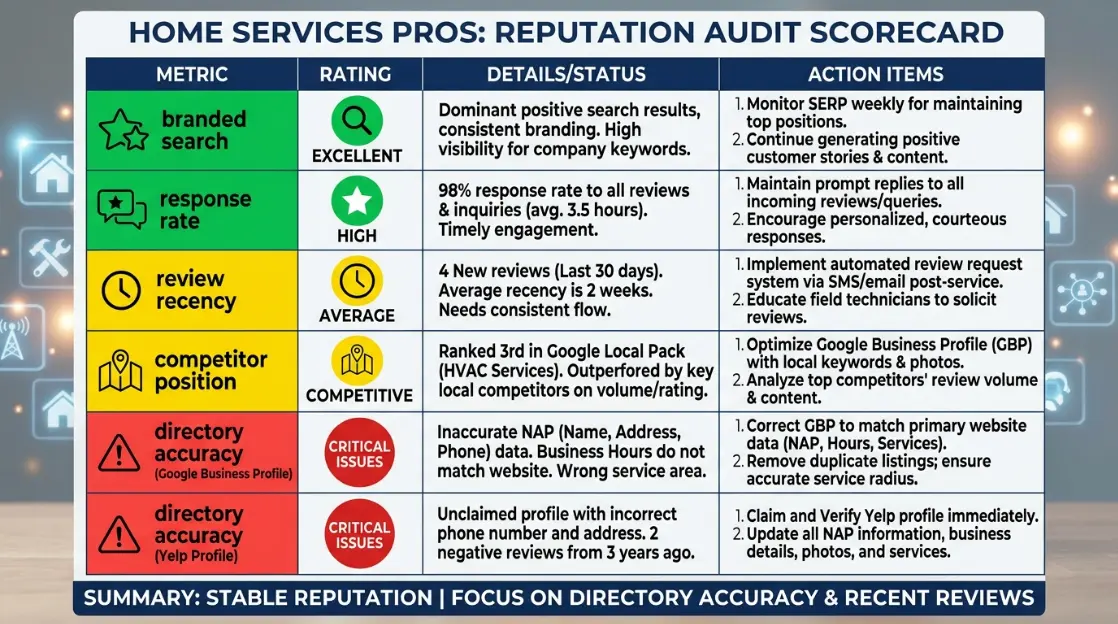
Now that you have the data, here is how to interpret it. Use this framework to score each area of your audit as Green, Yellow, or Red.
| Area | Green | Yellow | Red |
|---|---|---|---|
| Branded search | Your site ranks first, knowledge panel shows 4.3+ stars, no negative results on page one | You rank first but a review site with a lower rating appears in top three | Negative content or a competitor appears for your brand name |
| Google rating | 4.4 or above | 4.0 to 4.3 | Below 4.0 |
| Review recency | New review within the past 14 days | New review within the past 30 days | Last review older than 30 days |
| Response rate | 90% or more of reviews answered | 60% to 89% answered | Below 60% or negative reviews left unanswered |
| Directory accuracy | Name, address, phone consistent across all major platforms | 1 to 2 minor inconsistencies on secondary directories | Wrong phone number or address on Google, Yelp, or Apple Maps |
| AI search visibility | Your business appears in results for your primary service and city | Your business appears only when your exact name is searched | Your business does not appear in AI results at all |
| Competitor position | You have the highest rating and most reviews among local competitors | Your rating is competitive but review count trails the leader by 50+ | A competitor has a higher rating and significantly more reviews |
Count how many areas are Green, Yellow, and Red. Any Red item in the branded search, Google rating, or directory accuracy category should be the first priority. Yellow items in review recency and response rate are typically the fastest to improve and have the most immediate impact on both search rankings and conversion.
What to Do Based on Your Results
The audit tells you what your reputation looks like. What happens next depends on which areas came back Red or Yellow.
If your Google rating is below 4.0: This is the most urgent fix. A rating below 4.0 is visible to every person who sees your business in search results and actively suppresses click-through rates. The fix requires a review generation system that consistently asks satisfied customers for reviews, not just relying on the occasional customer who leaves one unprompted. Asking at the right moment in the service process, within 24 to 48 hours of job completion, is what separates businesses that grow their rating from those that stay flat.
If you have negative reviews without responses: Respond to every unanswered negative review today. A professional, specific response to a negative review tells prospective customers more about your business than the review itself. Ignoring it tells them the same thing.
If your directory data is wrong: Fix Google Business Profile and Apple Maps first since those two platforms drive the most traffic. Then claim and correct Bing Places and Yelp. For the aggregator ecosystem, a directory management service pushes correct data to the full network rather than requiring you to fix each one individually.
If you do not appear in AI search results: This is a longer-term signal issue. The combination of more reviews, higher rating, better directory consistency, and relevant content about your services on your own website all contribute to AI citation. A business that ranks well in traditional local search generally appears in AI results as well, so the fix is the same as the fix for local SEO more broadly.
Online reputation management services handle the monitoring and response infrastructure so the fixes above happen continuously, not just after a quarterly audit catches a problem. For businesses where the audit results showed multiple Red areas, a full audit from Nextvure maps the specific gaps and builds a 90-day rebuild plan.
Know Where You Stand Before a Customer Tells You
The businesses that maintain strong reputations in competitive markets are not doing anything extraordinary. They know what their reputation looks like right now, they catch problems early, and they respond to reviews before the window for recovery closes.
If your audit results came back with more Yellow and Red than you expected, that is a normal finding for a business that has not done this before. The information is what you needed.
If you want a professional reputation audit that covers every platform, maps your competitor gaps, and comes back with a prioritized action plan, talk to Nextvure about what a full reputation audit includes for your market and service category.